Why a Visualiser Brings Better Enquiries
Most people find it hard to picture a pool in their own backyard, a gate across their driveway or new joinery in their own wall. A gallery of photos helps, but it shows other people's jobs, not theirs. So they hesitate, or they send a vague enquiry - "how much for a pool?" - and you spend the first phone call working out what they actually want.
A visualiser turns that around. The customer plays with the size, shape, colours and extras until it looks right, sees it in 3D from every angle, and sends you the design with their name and number. You start the conversation knowing what they want, and they start it already invested in the idea. It is also simply a page people enjoy using, which is a rare thing to be able to say about a business website.
Talk to Us About a Visualiser
Tell us what you sell or build and the choices your customers make. We will tell you honestly whether a visualiser suits it and what it would take.
Start the ConversationExample: The Crystal Clear Pool Visualiser
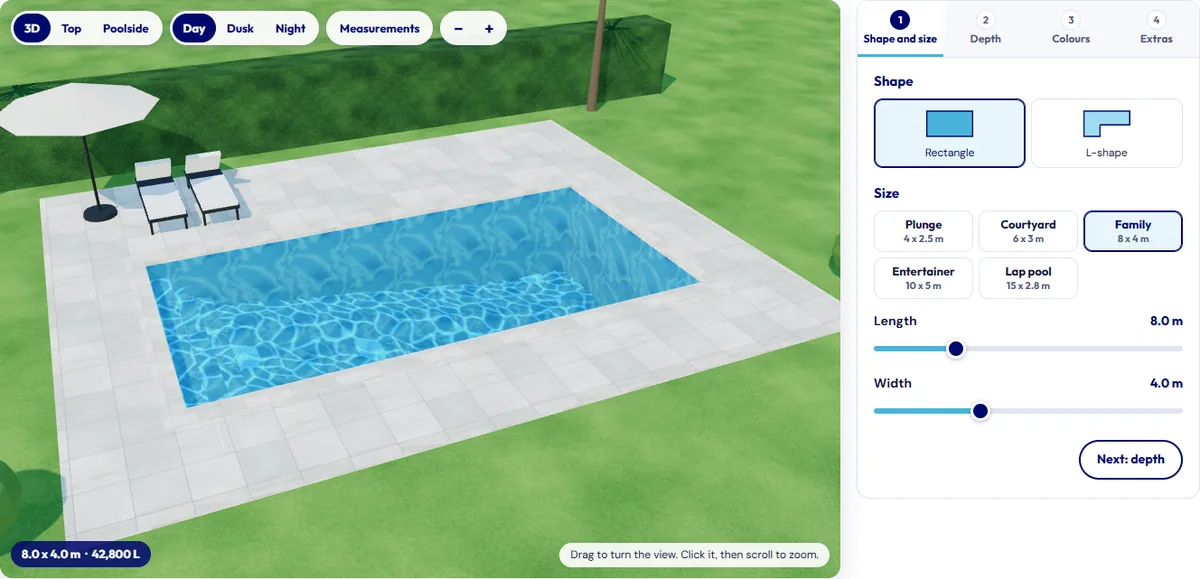
Crystal Clear Pool Services builds and maintains swimming pools around Tauranga and the Bay of Plenty. Their pool visualiser takes a customer through four steps beside a live 3D view of the pool in a backyard, with the water area, volume, perimeter and deepest point updating as they go, and a plan and a long section drawn to the sizes they choose.
| Step | What the customer chooses |
|---|---|
| Shape and size | Rectangle or L-shape, from a 4 x 2.5 m plunge pool to a 15 m lap pool, or any length from 3 to 20 m and width from 2 to 8 m. |
| Depth | Constant depth, a gentle slope, or separate shallow and deep zones, from 0.9 m to 2.4 m deep. |
| Colours | The pool liner colour, then the coping and paving - travertine, sandstone, honed concrete, bluestone or charcoal - or a timber deck or lawn. |
| Extras | Entry steps and benches, a sun ledge, handrail or ladder, a raised spa, a feature wall with a waterfall, underwater lights, a heat pump, pool fencing and a cover. |
| Views | Drag to turn the pool around, switch between 3D, top-down and poolside views, and between day, dusk and night lighting to see the lights. |
When the design looks right, "Send this design to us" fills in the enquiry form on the same page with the full specification and a link that reopens that exact design, so the team sees what the customer saw. The customer can also copy the link or save a picture to show the family. Prices are deliberately left out: every backyard is different, so the design starts the conversation and the quote follows.
More Visualisers on the Way
Three more visualisers are built and launching with their clients' new websites. We will link them here as each one goes live.
- A 3D gate visualiser for a Canterbury gate manufacturer. Every one of their 24 gate styles is generated from their own technical drawings, in 20 powder-coat colours, and the customer can swing the gate open and shut before sending the design.
- A 3D window and door visualiser for an Auckland aluminium joinery company. Awning, sliding and bifold windows and hinged, French, stacker and bifold doors, sized with sliders, with frame colours, glass including obscure privacy glass, and hardware, shown against weatherboard, brick or plaster - and viewed from inside the room.
- A roof colour visualiser for a Rodney roofing company. The customer picks the roof shape, the roofing profile and a colour from the manufacturers' published ranges, drawn on a house so they can see the effect before they ask about it.
- A build cost estimator for Marsden Homes. Not every tool needs to be 3D: twelve quick questions about the section, the home and the budget give the customer an indicative price range and give Marsden Homes a well-qualified enquiry.
What a Visualiser Could Do for Your Business
A visualiser suits any business where customers choose between sizes, shapes, styles or colours before they buy, and where seeing it makes the decision easier. Pools and spas, gates and fencing, windows and doors and roofing are the ones we have built so far. The same approach works for decks and pergolas, garages and sheds, cladding and paint colours, paving and driveways, kitchens and benchtops, signage and vehicle wraps. If your customers ask "what would it look like?", a visualiser is worth a conversation.
How We Build One
Your products
We start from your real ranges, sizes, colour charts and drawings, and the questions customers ask before they buy.
The choices
We agree the steps, the options in each and the rules between them, so a customer cannot design something you do not make.
Build and test
We build it in 3D for the browser and test it on phones and computers, with touch as well as a mouse.
Connect to leads
The design goes into your enquiry form, arrives in your inbox and our free CRM, and carries the visitor's source.
The Technology Behind It
Our 3D visualisers are built with three.js, the widely used open-source library for drawing 3D graphics in the web browser through WebGL. Shapes are generated in code from your product rules rather than loaded as heavy model files, so a 15 m lap pool or a double gate with an arched top is drawn to the exact dimensions the customer sets.
The 3D code loads on the visualiser page only, so the rest of your website stays light. Each design can be saved as a link that reopens it exactly, which is how the design travels with the enquiry. On screen it is a guide rather than a technical drawing, and colours vary between screens, so the visualiser says so and suggests seeing a physical sample before choosing.
- Runs in the browser
- Phone and touch ready
- Your real products
- Exact dimensions
- Design link with the lead
- Save a picture
- Source tracking
- Fixed quote
A visualiser works best as part of a website built to turn interest into enquiries. Our AI websites are planned around the searches your customers make, so the people who find the visualiser are the right people, and every design they send lands in your free CRM alongside your other enquiries, with where the customer found you.
3D Visualiser FAQs
Do my customers need to download anything?
No. The visualiser runs in the web browser on the page itself, on a phone, tablet or computer. There is no app to install and no plug-in to enable.
Will it work on a phone?
Yes. We build them for a finger on a phone screen as well as a mouse: on the pool visualiser you drag to turn the view and pinch to zoom, and the same choices are there on a small screen as on a computer.
Can it show my actual products and colours?
That is the point of building one. We work from your own product ranges, sizes, colour charts and technical drawings, so a customer chooses from what you actually make or install rather than generic shapes.
Can it show prices?
It can show an indicative price where your pricing is simple enough to work out from the choices. Many businesses prefer not to, because every site is different: Crystal Clear Pool Services deliberately leaves prices out and lets the design start the conversation.
Do I need a new website to have one?
Not necessarily. We have built visualisers as WordPress plugins and as part of our Cloudflare websites. They fit most naturally on our new AI websites, where the enquiry form, source tracking and free CRM are already built in.
How much does a 3D visualiser cost?
Every visualiser is different, so each one is quoted as a fixed price after a short conversation about your products, the choices customers make and what you want sent to you. The first conversation is free.
Contact Us
Try the Crystal Clear pool visualiser, then call 0800 254 251 or send us an enquiry about what you sell or build. We will come back with an honest view of whether a visualiser suits your business and a fixed quote if it does.