Why We Give Our Clients a CRM
A website that brings in enquiries is only half the job. The other half is answering them, following them up and knowing which ones turned into work. In most small businesses that lives in an email inbox, a stack of texts, a notebook in the ute and somebody's memory, and enquiries slip through the gaps: the quote that never got chased, the customer who rang twice, the form that went to an old address. We have seen it across hundreds of the businesses we work with, and a lead that is never followed up costs exactly as much to win as one that is.
So we built Click n Call Leads, a simple CRM made for owner-operators rather than sales departments, and we give it to our website clients for free. It does a handful of things well: it puts every enquiry in one place the moment it arrives, shows you where each customer found you, keeps their details and your notes together, and reminds you to follow up. There is nothing to set up yourself - we connect it to your website and send you a login.
Ask Us for a Login
If your website is with Click n Call, we connect it to the CRM, test it with an enquiry of our own, and send you an invite.
Get My LoginWhat It Looks Like
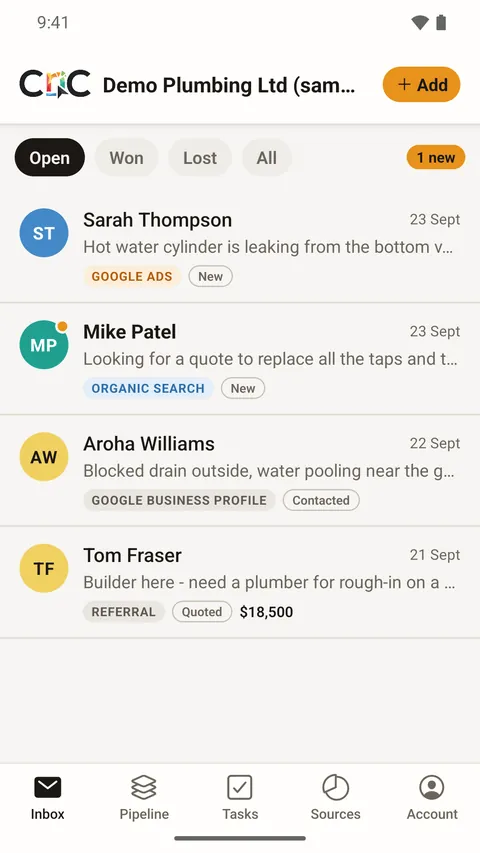
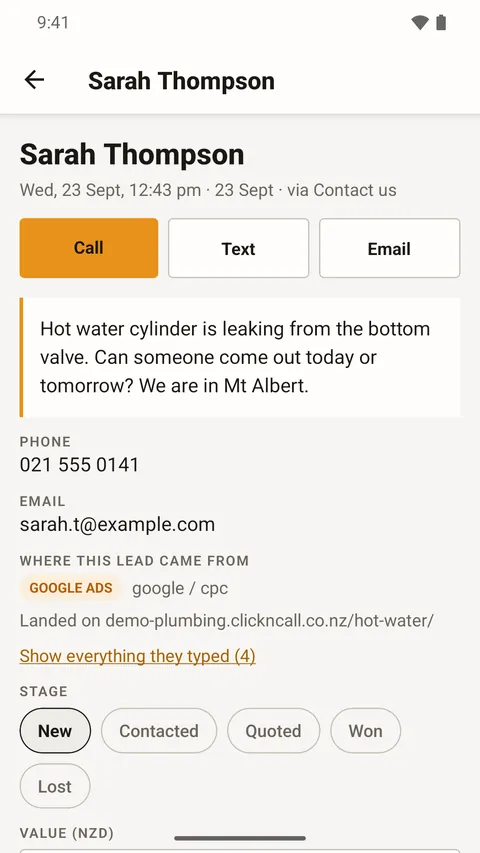
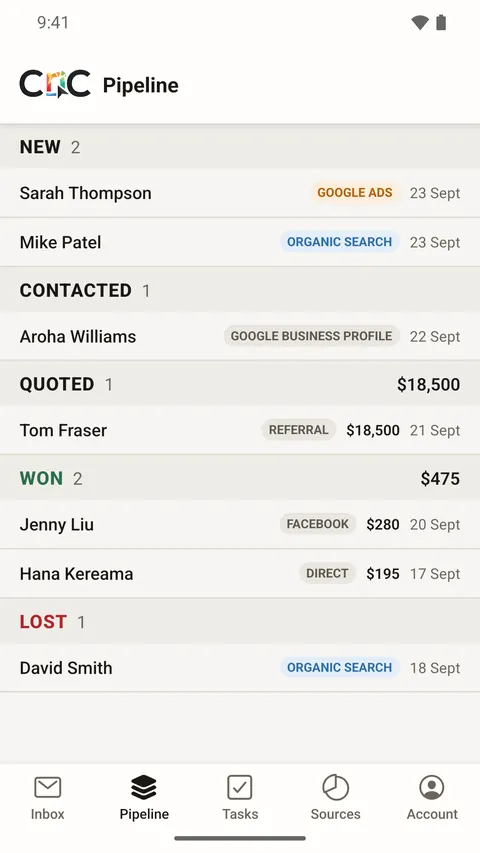
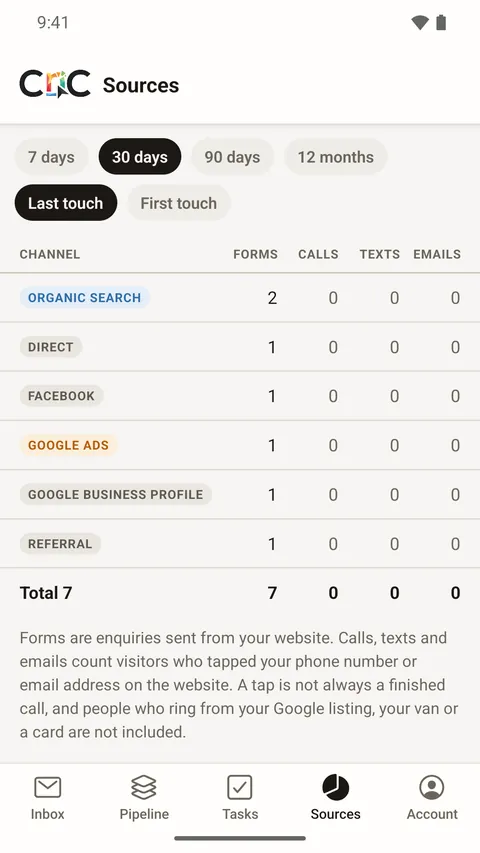
Screens from Click n Call Leads on a phone, showing a demonstration account with sample data.

What the CRM Does
| Feature | What it means for you |
|---|---|
| One inbox | Every enquiry from your website forms arrives within seconds, newest first, with an unread count and Open, Won and Lost filters. |
| Where it came from | Each lead shows how the customer found you - Google Ads, a Google search, Facebook or Instagram ads, social media, another website or typed in directly - with the campaign and the page they landed on, where tracking is available. |
| Customer details together | Name, phone, email, everything they typed into the form, your notes and a timeline of what has happened, all on one page. Tap to call, text or email them back. |
| Pipeline | Move each lead from New to Contacted, Quoted, Won or Lost. Mark it won and record the job value; mark it lost and note why. |
| Follow-up tasks | Add a task to any lead with a due date. The Tasks screen shows what is overdue, due today and coming up, so nothing slips. |
| Leads added by hand | Phone calls, walk-ins, referrals and repeat customers go in the same list with a tap, so you see all your work, not just the website's. |
| Sources report | Enquiries added up by channel over the last 7, 30 or 90 days or 12 months, including on WordPress sites the taps on your phone number and email address. |
| Email alerts | An email for every new website enquiry, and replying to it goes straight to the customer. |
| Your team | Logins for your staff as owners, staff or read-only users, with leads assigned to the right person. |
| Weekly traffic | On our Cloudflare websites, your weekly website traffic report can show in the CRM as well as in your email. |
See Which Marketing Brings In Work
Every website we connect gets a small first-party tracking script that remembers how a visitor first arrived and how they arrived most recently. When they send an enquiry, both are attached to the lead. So you can see that a customer first found you through a Google search, came back a week later from a Facebook ad and then filled in the form, and you can switch the Sources report between first touch and last touch to see each side of that story.
Put that next to the stage and job value you record, and you can see which channels bring in enquiries and which bring in work. If you advertise with us on Google Ads or Facebook and Instagram, that is the difference between counting form fills and knowing what the advertising actually earned.
- Google Ads
- Organic search
- Google Business Profile
- Facebook and Instagram
- Referral
- Direct
- Added by hand
- AI receptionist
Your Website Keeps Emailing You
The CRM is never the only copy of an enquiry. Your website's own notification emails keep arriving exactly as they do now, and the CRM receives a copy alongside them. If the internet hiccups at the wrong moment, the enquiry still reaches your inbox the way it always has. We built it that way because the worst thing a CRM can do is lose a lead.
Add an AI Receptionist
The CRM is also where our AI receptionist files its enquiries. For $29 a month + GST it answers your website chat and your phone line at any hour, takes the customer's details and drops a complete lead, with the whole conversation or call transcript, into the same inbox. Its chats and calls show up on the Sources screen in their own columns, so you can see what it is bringing in.
Private and Secure
Customer names, phone numbers and messages are personal information, and the Privacy Act 2020 sets out how a business has to collect, store and protect them. Each business in the CRM sees only its own leads, enforced by the database itself rather than by the app, and an automated test checks that separation every time the CRM is updated. There are no passwords to forget or reuse: you sign in with a link or a six-digit code sent to your email. The data is stored in Sydney, Australia, and there is no advertising and no tracking inside the CRM itself.
On Your Phone
The Click n Call Leads app for iPhone is on the App Store, with a notification the moment a lead arrives. Download it and sign in with the login we send you. The Android app is on its way to Google Play. Click n Call Leads also runs in the browser on any phone, tablet or computer at leads.clickncall.co.nz, and you can add it to your phone's home screen like an app.
How to Get Started
Ask us
Call or email and tell us which website and who should have a login.
We connect it
We connect your website's forms to the CRM, send a test enquiry through and remove it again.
You get an invite
An email invite arrives. Sign in with the link or the code - no password to choose.
Leads arrive
From then on, every enquiry lands in your inbox with where it came from. We add your staff whenever you ask.
Not a Click n Call client yet? The CRM comes with the websites we build and look after, including our new AI websites. See our website design page for what every site includes.
Free CRM FAQs
Is the CRM really free?
Yes. Click n Call Leads is free for businesses whose websites we build and look after, for as long as you are a client. There is no free trial that runs out and no paid tier with the useful parts held back.
Will I still get enquiry emails from my website?
Yes. Your website keeps emailing you exactly as it does now. The CRM receives a copy of each enquiry, so it is never the only place an enquiry exists.
Can my staff use it too?
Yes. A business can have several people, each with their own login, as an owner, staff member or read-only user. Leads can be assigned to a person, and everyone sees the same list. Tell us who to add and we send them an invite.
Is there a phone app?
Yes. The Click n Call Leads app for iPhone is on the App Store, and the Android app is on its way to Google Play. The CRM also works in the browser on any phone, tablet or computer, and you can add it to your phone's home screen.
Who can see my leads?
Only the people in your business. Each business sees only its own leads, and that separation is enforced by the database itself and checked by an automated test every time the CRM is updated. The data is stored in Sydney, Australia.
Can I add enquiries that did not come through the website?
Yes. Phone calls, walk-ins, referrals, texts, emails and repeat customers can be typed in with a tap, with a follow-up task if you want one, so they sit in the same list as everything else.
Does it work with my website?
Most of the websites we look after can be connected, both WordPress sites and our Cloudflare websites. We check yours when you ask, connect it, and send a test enquiry through before we hand it over.
Contact Us
Call 0800 254 251 or send us an enquiry and ask for a Click n Call Leads login. Tell us your website address and who in your business should have access, and we will get you started.